Authentic iPhone Battery Replacement
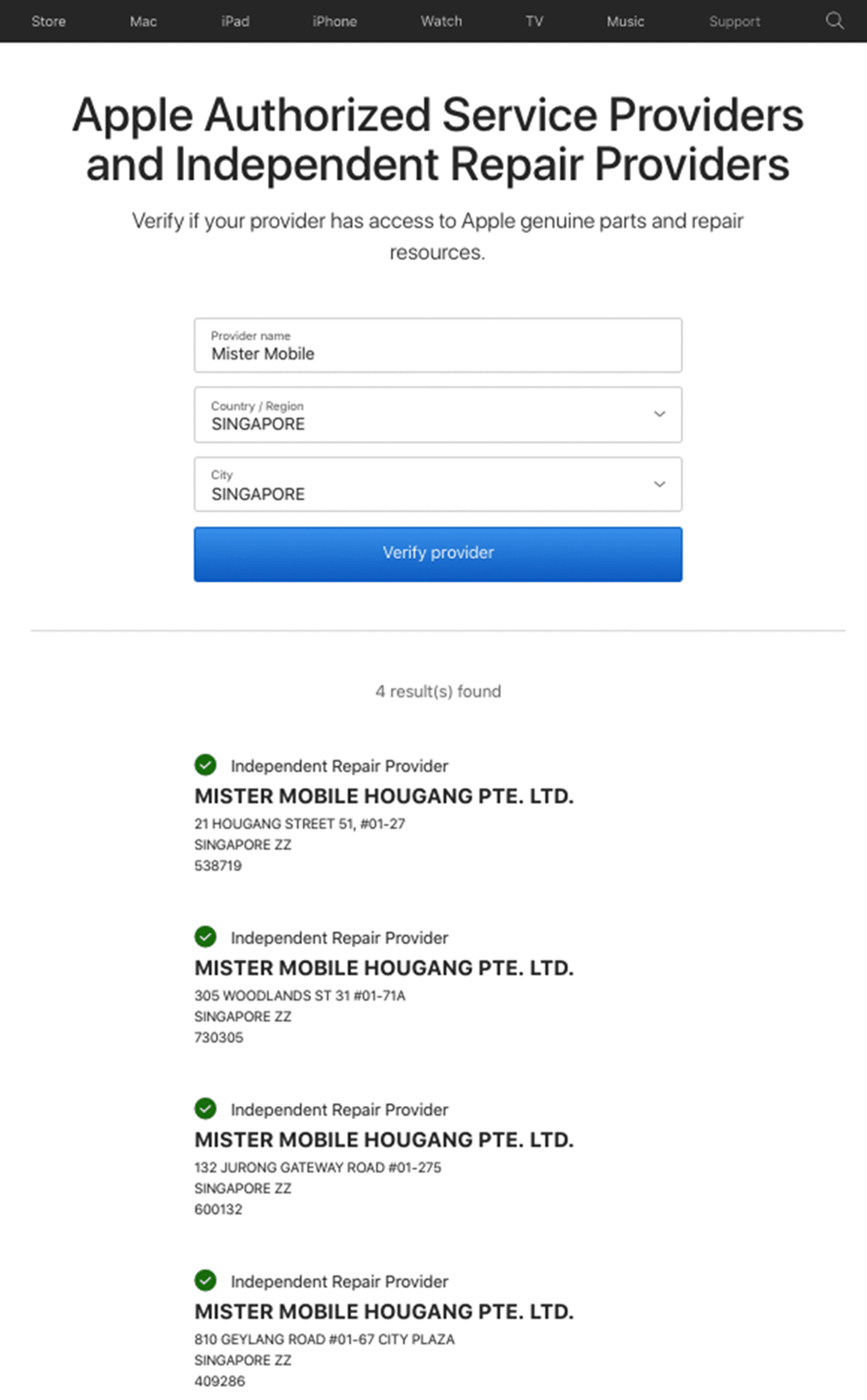
Mister Mobile has access to Apple Genuine Parts.
Apple has granted us access to Apple diagnostic tools, repair processes, and most importantly, GENUINE iPhone batteries.
As an independent repair provider, your iPhone will be handled professionally and reliably by our Apple-certified technicians.
Verify Mister Mobile as Independent Repair Provider here!
How do I know if my iPhone battery needs replacing?
All rechargeable batteries, including iPhone battery, are consumable and has a limited life span. As time pass, the internal circuitry will deteriorate, and the iPhone battery capacity and performance will decline.
Some obvious signs of a deteriorated batteries include reduced iPhone battery life, iPhone battery health dropping below 80%, slower app launch times, frame reductions during gaming sessions, and so on.
If your iPhone is having such battery issues, it may be time to consider getting an iPhone battery replacement.
In some serious cases, you may encounter a swollen battery. Swollen iPhone batteries usually happen due to excessive charging, manufacturer defects (super rare), bad iPhone battery replacement quality, or damage to the battery.
Do not ignore these signs, as a damaged battery is a safety hazard. If you feel your iPhone battery is damaged, go to an Independent Repair Provider to get your iPhone battery replaced, using original iPhone batteries.
Apple-approved repairers such as Mister Mobile guarantees a reliable iPhone battery replacement, using original parts supplied directly from Apple.
How much does an iPhone battery replacement cost?
Our repair cost is much lower than any other repair center. The actual repair cost depends on the iPhone model. The labor fee is already included in the costs quoted before commencing with the repair process. You’ve got the repairs you need.
About Battery Health in Apple iPhone
Apple iPhones have a battery health feature that shows your current iPhone’s battery health. It can be found on Settings App > Battery > Battery Health.
Here, you will see a few information:
- Maximum Capacity
- Peak Performance Capability
- Optimized Battery Charging
Maximum Capacity
The iPhone battery maximum capacity shows the battery capacity compared to when it was new. As time passes, the iPhone battery will chemically degrade, and you will soon start to realize a reduction in usage hours.
Your iPhone is designed to reach the 80% capacity mark after approximately 500 complete charging cycles, which translates to an estimated usage of 18 months to 2 years.
Peak Performance Capability
As the iPhone battery deteriorates, its ability to deliver peak performance will also be reduced.
Depending on your battery’s Maximum Capacity, your iPhone will show some messages to warn you about the battery issue.
- Your battery is currently supporting normal peak performance. This message indicates that your battery is normal and is delivering peak performance during your daily routine.
- …Performance management has been applied… which means the battery is struggling to deliver peak performance.
Important Messages
In some serious cases, iPhone owners may see the following messages:
- Unable to verify this iPhone has a genuine Apple battery.
- Your battery’s health is significantly degraded.
- Unable to verify this iPhone has a genuine Apple battery.
These messages usually show up on the very top of the Battery Health feature page but don’t indicate a dafty issue. However, you may face performance reduction and shorter usage hours.
We recommend an iPhone battery replacement as soon as possible so that your iPhone can continue to perform at peak performance.
Frequently asked questions for iPhone original battery replacement
“My iPhone does not respond even though I am charging it. Does this mean I have a faulty battery?”
If your iPhone can be powered on but cannot charge, you need to replace the charging port of your iPhone. If your iPhone cannot be powered on at all, the problem may lie with either the motherboard, LCD, charging port, or battery. You can bring your iPhone to one of our Mister Mobile branches for a free check if you are not sure whether your iPhone battery needs a replacement.
“Will you be using original parts for iPhone battery replacement?”
Yes! Mister Mobile is now Independent Repair Provider! Our Apple iPhones batteries are original and genuine, supplied directly from Apple.
“Does the iPhone battery cost savings of up to 60% justify choosing a third-party service repair provider over the Apple service center’s repair service?”
Yes. We can do your iPhone battery replacement on the spot, and there will be NO data loss 99% of the time during the repair progress. Read more here
“Is it worth replacing the iPhone battery?”
Yes! Getting an iPhone battery replacement will prolong your phone’s lifespan. The new iPhone battery will allow you to use the iPhone longer until you decide to get an upgrade.
“Do you provide other repair services besides battery replacement?”
Yes! We do provide repair services including cracked screen replacement, LCD replacement, camera replacement, back glass replacement, and so on. You may find all our Apple repair services here.
“What iPhone models does Mister Mobile provide repair for?”
We provide repair for a wide range of iPhone models ranging from iPhone 6, iPhone 6S Plus, up to iPhone XR, iPhone XS, iPhone XS Max, iPhone 11, iPhone 12, iPhone 13 and many more. Other eligible models can be found here.
How do I book an appointment for my iPhone battery replacement?
- Find the iPhone repair you need to fix your problem.
- Add to Cart and proceed to Check-out. No payment is required for online check-out.
- Enter the promo code found at the check-out page for $3 off. Applicable for all online orders only.
- Wait for confirmation SMS from our friendly staff. (We strive to respond within 1 hour.)
- Drop by to get your iPhone repair done. Pay for your iPhone repair in our store after you got it back and confirmed the repair is done.
It’s that simple! Contact us by hitting the WhatsApp button or call us at 92230410!




 The device is brand new, unused, and comes in its original packaging with all original accessories included.
 The screen is flawless with no scratches, in pristine condition. The exterior looks like new, with minimal signs of wear that are hardly noticeable even up close. The battery health is at 90% or above, ensuring strong performance.
 The screen has minimal scratches that are only noticeable when the display is switched off. The exterior shows minimal signs of wear, such as paint peel, light scratches, or small case marks, but these are only visible from a distance and do not affect the overall appearance. Overall, the device is in excellent shape with very slight signs of use. The battery capacity is at least 85%.
 The screen may have some visible scratches, but they don’t affect how the device works. The body shows signs of use like scratches, dents, or small chips, but these are purely cosmetic. Overall, the device is in good working order, with a battery capacity of at least 85%.
